
What Is a Chief Data Officer in 2026? Many people working within the data industry are saying the same thing: the role of the Chief Data Officer (CDO) has changed – but how? CDO Magazine began an expert survey to find out. We recent...
2026 CDO Report: Meet the Modern Data Team New survey of VP & C-level data and AI leaders confirms what’s stalling AI transformation.
Generative + Agentic AI: Moving From Experimentation to Enterprise Scale Generative and agentic AI are making their way into enterprise production, bringing new questions for Chief Data Officers (CDOs) and other data and AI leaders responsible for making these technologies...
Artificial Intelligence
WordPress Unveils Built-In AI Assistant for Site Creation and Editing

Written by: CDO Magazine
Updated 12:56 PM EST, February 23, 2026
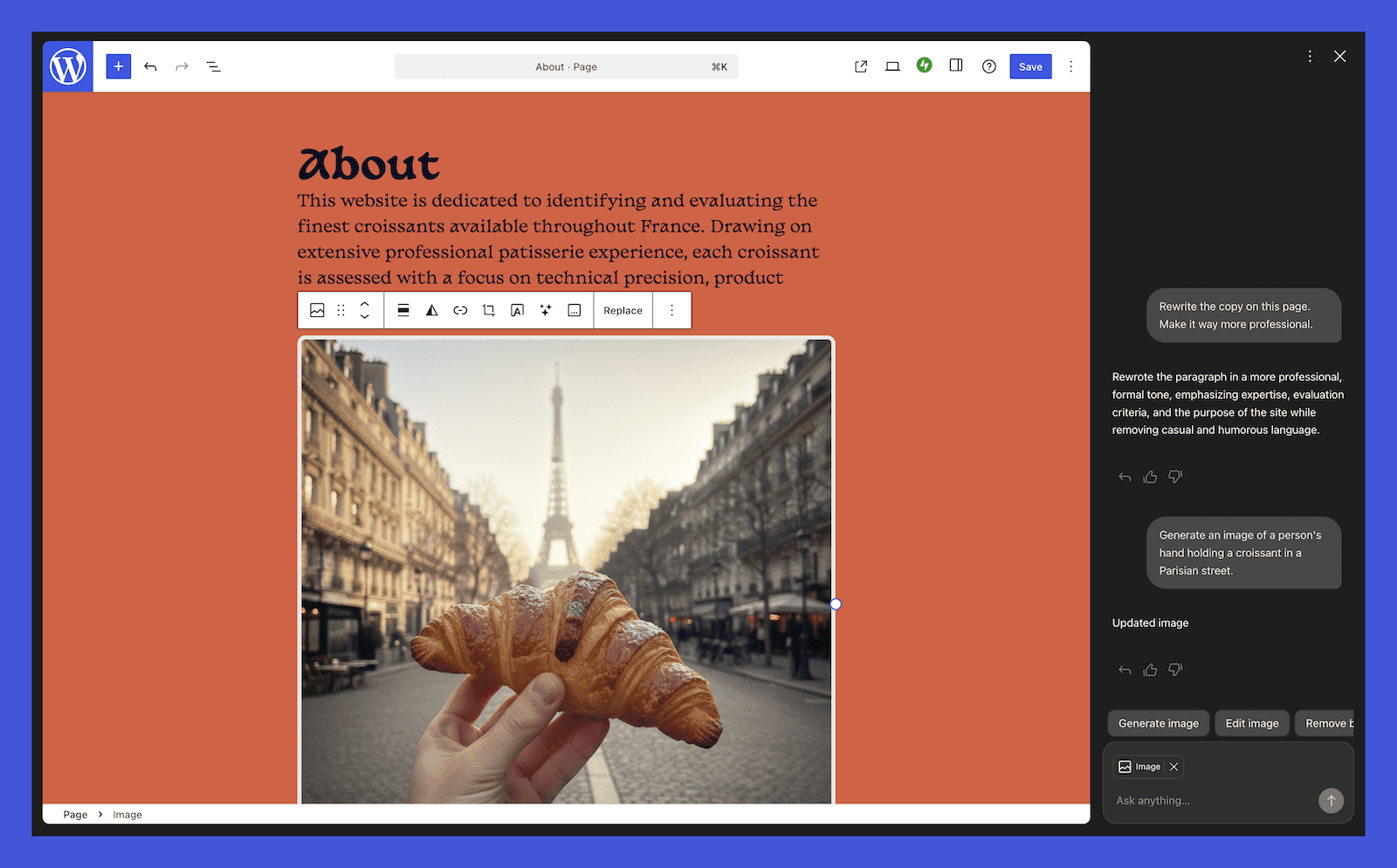
WordPress.com has introduced a new AI Assistant directly into its platform, expanding on the conversational technology behind its AI website builder. The feature is now available to users on Business and Commerce plans at no additional cost.
Users familiar with the company’s AI-driven site builder will recognize the experience: building and refining a website through conversation. With this latest rollout, that capability extends beyond initial setup. The assistant now operates inside the editor and media library, offering real-time support without requiring external tools, manual copy-pasting, or coding adjustments.
Unlike standalone AI applications, the WordPress AI Assistant functions within the site’s existing structure. It understands page layouts and content context, enabling users to make design and editorial changes as they work.
Some of the new features include:
Conversational Design and Content Support: Once enabled, the assistant appears across key areas of the WordPress dashboard. It can help with structural decisions, layout adjustments, and content refinement directly within posts and pages. Users can request changes conversationally, and changes appear in real time, allowing creators to maintain workflow continuity.
AI-Powered Image Creation and Editing: The assistant also extends into the media library, where users can generate or modify visuals without leaving the platform. The feature supports new image creation as well as targeted edits to existing assets, with controls for aspect ratio and stylistic direction. The tool leverages the latest Nano Banana models, according to WordPress.com, eliminating the need for additional AI subscriptions.
AI Integration in Block Notes: The assistant also builds on the block notes functionality introduced in WordPress 6.9, which allows teams to collaborate directly in the editor. With AI integration, users can tag the assistant in notes to request contextual feedback or information. Responses draw from the content being edited, along with relevant external information where applicable.
Users can activate the AI Assistant through their site settings by navigating to the “AI tools” option and toggling it on. Sites created using the AI website builder will have the assistant enabled automatically, regardless of plan.
The assistant is optimized for block themes. While it does not appear within the editor for classic themes, image generation and editing remain available in the Media Library.
With this launch, WordPress.com is positioning AI not as a separate tool but as an integrated part of the publishing environment, embedded directly where users design, write, and manage their sites.



 Elevate Your Personal Brand